Managing Projects In NetSuite: Best Practices For Growing Teams
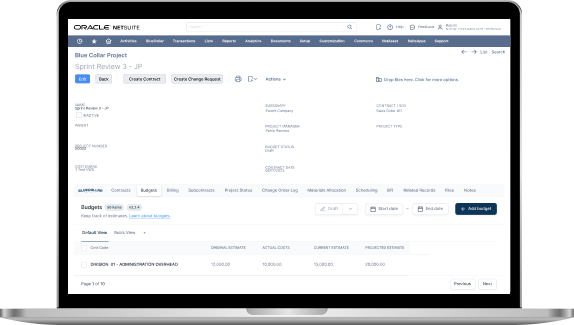
Growth is exciting until the wheels start to wobble. The same team that used to "just know" what's happening on every job suddenly needs more meetings, more updates, and more spreadsheets. Schedules drift, costs are delayed, and project managers spend their days chasing information instead of leading work.
NetSuite can be the place where your team gets back to running projects with confidence. The goal isn't to add processes for the sake of it. The goal is to create repeatable habits that maintain high visibility, clear accountability, and protected margins as volume increases.
In this guide, we'll walk through the best practices we use to help growing teams manage delivery inside NetSuite ERP with fewer surprises and stronger control by using the right NetSuite Construction Software.
Why Project Management Gets Harder As You Grow
Early on, your project's operations run on proximity. People sit near each other, questions get answered in the hallway, and the latest job status lives in someone's head. That works until you add more crews, more project managers, more subcontractors, and more jobs running at the same time. At that point, informal communication stops scaling, and small gaps start turning into real financial risk.
The first thing that breaks is visibility. A schedule update doesn't make it back to the office; procurement keeps ordering under an old plan, and the job starts slipping. The second thing that breaks is cost control. Labor and materials keep moving, but the budget review happens too late to change the outcome. The third thing that breaks is trust in the numbers. If each department has its own tracker, nobody agrees on what's true.
Most growing teams run into the same patterns:
- Project status lives in emails, not in a shared system.
- Budget changes don't flow into forecasts, so leadership gets surprised.
- Field teams report late because the process is painful.
- Change orders pile up, and nobody knows what's approved.
- People spend hours reconciling data instead of acting on it.
The fix isn't "more reporting." The fix is a single operating rhythm that keeps schedule, budget, commitments, and billing aligned. NetSuite can support that rhythm if you treat it like the place where project truth is maintained, not a system you update after the fact.
How NetSuite Should Function As The Project System Of Record
A project system of record is simply the place your team goes to answer core questions without debate. How are we tracking against the budget right now? What commitments are still open? What work is at risk next week? What has been billed, and what's still waiting on approvals? If those questions require three spreadsheets and a meeting, the system of record isn't doing its job.
NetSuite works best when you draw a clean boundary around what must live inside it. Financials, budgets, commitments, time, expenses, billing status, and project structure belong in NetSuite. Specialized tools can still be useful for documents, detailed drawings, or field capture, but the outputs should flow back to the same place where your job costs and project financial picture are maintained.
To keep that picture coherent, your project setup should connect the essentials:
- Customer and contract details are tied to the project record.
- Tasks and phases are tied to a consistent cost code structure.
- Budgets aligned to the same categories you track actuals against.
- Purchase commitments tied to the job, so cost-to-complete stays real.
- Time and expenses are captured on the same structure the budget uses.
Once those relationships are stable, your team stops "closing the books on a project" weeks after the work happens. You start running the job live, with decisions based on what's happening now.
Establish A Standard Project Setup Process
Growing teams don't need more creativity in setup. They need consistency. A standard project setup template turns onboarding into a checklist, makes training easier, and ensures reliable reporting across every job. It also reduces the hidden tax of growth, which is the time senior people spend correcting basic setup mistakes.
Start with a defined project "start package" that every job gets, even if it's small. That package should include the project type, a standard phase list, your cost codes, and a task structure that matches how you actually run work. If your budget is phase-based, your tasks should reflect that. If your billing is milestone-based, your schedule should reflect that.
A strong setup process typically includes:
- Confirm contract value, billing method, and retention terms.
- Load the standard phases and tasks for the project type.
- Assign internal roles, including approvals for budget and changes.
- Build the baseline budget with the right cost codes and cost types.
- Create the reporting cadence and lock in the dashboard views.
Standard fields matter more than people think. Department, location, job type, and cost categories become the backbone of reporting later. If you leave those optional, you'll spend months cleaning data just to answer basic questions.
If your team manages multiple lines of work, create multiple templates. One for fixed price construction, one for service and smaller jobs, and one for internal projects. The goal is a short list of templates that fit reality, not a giant menu nobody uses.
Turn Scheduling Into A Team Sport With Real-Time Updates
Schedules fail quietly. A date slips, a dependency gets missed, and the job "feels fine" until it isn't. For growing teams, scheduling becomes harder because more work becomes interdependent. A delay in one trade ripples into multiple follow-on tasks, and the cost impact shows up later as overtime, resequencing, and wasted mobilization.
The most important shift is treating schedule updates as a team responsibility, not a project manager's private document. Field leads and coordinators need a simple way to report progress and constraints to keep the schedule credible. The schedule doesn't have to be complicated to be useful. It has to be current and reflect real dependencies.
We recommend a few schedule hygiene rules that keep teams aligned:
- Use milestones and dependencies, not just due dates.
- Update progress on a weekly cadence that matches your reporting rhythm.
- Track constraints like materials and inspections as explicit blockers.
- Tie schedule milestones to procurement and subcontract commitments.
- Keep a clear baseline so variance means something.
As teams grow, "real time" doesn't mean constant updates all day. It means a dependable cadence that everyone respects. A weekly update that's accurate beats daily noise that nobody trusts.
Lock In Budget And Job Costing Discipline Early
Job costing discipline is one of the biggest separators between teams that scale profitably and teams that scale stress. The more volume you add, the more costly small inconsistencies become. If one project tracks labor under a different code than another, your historical data gets muddy. If budgets are built at a high level but actuals are captured at a detailed level, variance reporting becomes a guessing game; instead of a game you can change.
Start with one principle: budget at the same level you manage and report actuals. If your supers and PMs need to manage at the phase and cost type, your budget should live there too. If you track subs separately from materials, your budget should do the same. Clean alignment makes budget vs. actuals meaningful and speeds up forecasting.
Strong discipline usually includes clear ownership:
- Each cost code has an owner who reviews variance weekly.
- Budget revisions follow a defined approval path.
- The original budget stays visible, so revisions don't erase history.
- Commitments are reviewed, not ignored, because they predict the future.
Weekly is the right cadence for most growing teams. A short weekly review catches drift early, while there's still time to correct it. That review should include actual costs posted, open commitments such as purchase orders and subcontracts, and pending items, such as change requests that haven't hit the budget yet.
A simple weekly rhythm also improves estimating over time. If your data stays clean, you can pull real historical costs to refine bids, set contingency with more confidence, and spot which project types consistently outperform.
This is also where many teams first see the real value of keeping project truth in one place. If your cost picture is accurate, you can stop managing from the rearview mirror.
Manage Change Orders Without Chaos
Change orders aren't the enemy. Uncontrolled change is. As your team grows, change orders become harder to manage because more stakeholders touch the process. Field teams identify scope drift, PMs document it, operations reviews it, accounting needs it for billing, and leadership needs it for forecast accuracy. If those steps aren't connected, change becomes a pile of emails and delayed revenue.
A clean workflow starts with capturing potential change immediately, even before it's priced. That creates visibility and prevents lost requests. From there, the process should move through clear statuses and approvals so everyone knows what's real.
A practical change workflow looks like this:
- Log the potential change with scope notes, photos, and date.
- Price it and route for internal review based on approval thresholds.
- Submit to the customer with a clear status and due date.
- Convert to approved, then push updates into budget and revenue tracking.
- Close the loop with billing to keep cash timing accurate.
Controls matter because they reduce arguments later. Clear status labels, audit trail, and defined approval gates keep your team from treating "we talked about it" as approval. They also protect your relationship with the customer by ensuring documentation remains consistent.
If you run many changes, set up a weekly change review separate from the main job meeting. That keeps the main meeting focused on delivery while still maintaining financial control.
Make Role-Based Dashboards The Default
Dashboards aren't about pretty charts. They're about fewer meetings and faster decisions. As teams grow, people need different slices of the truth. Executives need risk flags and margin indicators. Project managers need to monitor budget variances and schedule health. Accounting needs billing status and retention. Field leads need what's due next and what's blocked.
A single dashboard that tries to do everything usually ends up doing nothing well. Role-based dashboards keep the experience simple and keep adoption high.
Here's how we typically break it down:
- Executives: margin trend, cost-to-complete movement, WIP signals, cash timing, top risks.
- Project managers: budget vs actual, open commitments, pending changes, billing readiness, schedule variance.
- Accounting: billing status, retention tracking, AR aging, revenue recognition readiness.
- Field leads: tasks due, labor plan, material status, punch list, and constraints.
Dashboards also support accountability. If everyone reviews the same metrics on the same cadence, "I didn't know," stops being a reason. Your team starts acting earlier because issues surface faster.
If you want dashboards to stick, keep them action-focused. Every metric should answer one question: what decision should we make next?
Resource Planning For Crews, Subs, And Equipment
Resource planning becomes the silent bottleneck during growth. You can sell more work, but you can't deliver it without capacity. That's true for crews, subs, and equipment. If resourcing isn't tied to the schedule and commitments, teams end up overpromising and scrambling.
Good resource planning doesn't require perfect forecasts. It requires a consistent view of upcoming demand and a way to spot conflicts early. That means looking at the next 2 to 6 weeks and asking what's actually required to hit key milestones.
Weekly signals worth monitoring include:
- Crew capacity vs. scheduled workload by phase.
- Subcontract scope and dates aligned with task dependencies.
- Equipment availability by location and project start dates.
- Material lead times that could block work.
- Upcoming inspections and approvals that affect sequencing.
As your team grows, resourcing becomes a leadership function rather than an afterthought. The more you can align schedule and capacity, the less overtime you'll need, and the less rework you'll absorb from bad sequencing.
Integrations And Data Governance That Keep Teams Aligned
Integrations can reduce admin, but only if data governance is clear. The fastest way to create chaos is by letting multiple tools update project data without rules. The goal is simple: keep NetSuite as the source of financial and project structure truth, and let other tools feed it cleanly.
Time capture, field updates, document control, and procurement tools can all play a role. What matters is defining what flows in, who owns it, and how exceptions get handled.
Data governance doesn't need to be heavy, but it does need to exist:
- Permissions set by role, not by individual preference.
- Required fields for project setup and cost coding.
- Naming conventions that stay consistent across job types.
- Budget revision control to prevent history loss.
- Baseline management of schedules to ensure variance is meaningful.
Teams that scale well treat governance like guardrails. The guardrails don't slow you down. They keep you from driving off the road.
Implementation And Adoption Plan For Growing Teams
Tools don't scale teams. Habits do. To improve project operations, roll out processes that fit how people work. Start with one project type or a pilot group, then standardize what works before expanding.
Training should focus on workflows, not clicks. People don't need to memorize every screen. They need to understand how the job runs from setup to closeout, and what "good data" looks like at each step.
A rollout plan that sticks usually includes:
- A clear playbook for setup, weekly reviews, and change control.
- Short training sessions aligned with real scenarios.
- Office hours for quick questions during the first month.
- Scorecards for timely updates on time, costs, and schedule.
- A simple closeout checklist to capture lessons learned.
Adoption improves when the system makes people's jobs easier. Dashboards that remove meetings, automated reminders that reduce chasing, and clear templates that prevent rework all create momentum.
If your team is growing fast, aim for progress, not perfection. A consistent 80 percent solution that everyone follows will beat a perfect design that nobody uses.
Common Mistakes To Avoid As You Scale
Most scaling pain is avoidable with the right software. It usually comes from a few decisions that feel small at the time, but create long-term friction.
One common mistake is over-customizing too early. Custom work can be valuable, but it shouldn't replace basic discipline, such as standard cost codes, clean budgets, and controlled change. Another mistake is letting spreadsheets become the real system. If the spreadsheet is where decisions are made, your team is guaranteeing delays and mismatches in numbers.
Watch for these red flags in the first 30 days:
- Projects are set up differently depending on who created them.
- Budgets don't match how actuals get coded.
- Change orders are tracked in email threads instead of a workflow.
- Dashboards are ignored because they aren't trusted.
- Weekly reviews focus on explaining data instead of taking action.
It's also easy to overlook closeouts. Clean closeouts yield better historical data, which in turn improves future estimates and planning. Teams that treat closeout as optional end up repeating the same mistakes on the next job.
If any of these issues sound familiar, the fix is rarely complicated. It's usually a matter of standardizing setup, tightening approvals, and creating a weekly rhythm that the whole team follows.
See BlueCollar In Action: A Cleaner Way To Run Projects In NetSuite
If your team is growing, you don't need more tools scattered across departments. You need a project operating system that keeps schedule, cost, commitments, and billing aligned without constant reconciliation. That's exactly what we help teams build inside NetSuite, with practical workflows that match how real project teams operate.
If you want a clear plan to clean up project setup, tighten job costing, and make change control painless, let's talk. We'll review how your projects are running today, identify the top gaps causing surprises, and map a phased path your team can adopt quickly.
Book a demo with BlueCollar and see what clean, connected project control looks like in your environment.
Frequently Asked Questions About Managing Projects In NetSuite
What Is The Best Way To Set Up Projects In NetSuite For A Growing Team?
A growing team needs consistency more than complexity. Start with a project setup template that includes your standard phases, tasks, and cost codes so every job launches the same way. Make key fields required to keep reporting clean, and assign clear owners for approvals. A consistent setup reduces training time and ensures comparable project reporting across every job.
How Does NetSuite Support Project Scheduling And Dependencies?
NetSuite can support scheduling and dependencies when you treat the schedule as a living plan tied to real work. Milestones and dependencies help teams see how one delay affects the next task, reducing last-minute scrambling. Regular updates from the field keep the schedule credible, and credible schedules drive better resourcing and procurement decisions. The goal is a dependable cadence that matches how your team runs weekly reviews.
Which NetSuite Features Help With Job Costing And Budget Vs Actual Tracking?
Job costing works best when budgets and actuals share the same structure. Cost codes, cost types, and commitments provide a clear view of what's been spent and what's still expected to be incurred on the job. Weekly variance review highlights where labor, materials, or subs are drifting before the job gets out of hand. Clean data also improves estimation because historical costs can be used with confidence.
How Do We Handle Change Orders In NetSuite Without Losing Control Of The Budget?
The key is to capture potential changes early and push them through defined statuses. A workflow with internal approvals protects margin and prevents "verbal approvals" from becoming surprises later. Once a change is approved, updates should be reflected in budget and revenue tracking to keep forecasts accurate. Good change control also keeps billing clean, since the approved scope doesn't sit in limbo.
Can NetSuite Work For Construction Project Management And Field Coordination?
Yes, especially when NetSuite is treated as the system of record for project financials and structure. Field updates, time capture, and procurement activity become more useful when they feed into a single project picture rather than separate trackers. This reduces double-entry and improves trust in the numbers. Coordination improves because teams can align delivery decisions with real cost and commitment data in project management.
What Reports Should Executives And Project Managers Review Each Week In NetSuite?
Executives typically need margin trend, cost-to-complete movement, and top risk indicators to steer the business. Project managers usually need budget variance, open commitments, pending changes, and billing readiness to run day-to-day execution. Accounting needs billing status and retention tracking to keep cash timing predictable. Weekly reporting works best when dashboards are role-based and action-focused.
How Do We Improve User Adoption For NetSuite Project Management Across Teams?
Adoption improves when the system reflects real workflows and saves time. Train people on the end-to-end process, not just where to click, and keep templates consistent so setup doesn't feel like reinventing the wheel. Short office hours during rollout help remove friction quickly, and scorecards for timely updates create accountability. Teams stick with the process when it reduces meetings and prevents surprises.
Does NetSuite Integrate With Other Construction Or Project Tools We Already Use?
NetSuite can integrate with many tools, and the best approach is deciding what NetSuite must own versus what other tools can provide. Time capture, field updates, and document control tools can feed NetSuite, so financial and project truth stays centralized. Clear governance matters so integrations don't create conflicting records. A clean integration strategy reduces double entry and improves decision speed.
What Should We Standardize First If We Are Scaling Fast And Our Processes Are Messy?
Start with the fundamentals that affect every job: project setup templates, a consistent cost code structure, and a defined change workflow. Add a weekly cadence for reviewing budget, commitments, and schedule health so problems surface early. Then build role-based dashboards so people stop relying on side spreadsheets. Standardization at the start creates a foundation you can scale without losing control.